It's 6 PM. The standup tomorrow is going to ask what shipped today. You sit down to answer that question — and you can't.
That's the moment time trackers are supposed to solve. They never do.
The good ones turn into productivity coaches that score your day on a scale you didn't pick. The cheap ones are subscriptions that quietly sync your window titles to a cloud they won't let you turn off. The Toggl-style ones rely on you remembering to start a stopwatch every time you switch tasks — which, if you've ever tried, you know is a fantasy. Apple's Screen Time is read-only, has no per-window detail, no per-tab detail, no export, and no break timer.
We built Timex because none of those work for us.
Timex 1.0.0 is an automatic time tracking app for Mac that does three things and only three things. It records what you actually did, second by second, into a local SQLite file you own. It reminds you to stretch without punishing focus. And it keeps your Mac awake with the lid closed when you're running a local LLM overnight. No cloud, no account, no telemetry. $24.50 once, forever.
The Problem Was Time Trackers
We spend our day in Octomind running agent tasks, in Claude Code wiring features, in Vext dictating thoughts into prompts. The hours move fast. The context switches are constant. At the end of the week, our calendars are clean and our memories are blurry.
So like everyone else we tried the existing tools.
Toggl asked us to remember to start a timer. We forgot. By Wednesday the data was reconstructed from memory — which, as anyone honest about it knows, is exactly the data quality you'd expect.
Rize and RescueTime scored our work hours and emailed productivity reports. They also sent our window titles to a server we didn't run. We turned them off.
Timing was closer — it tracked automatically — but the pricing crept into subscription territory and the data still lived in their format on their cloud.
Apple's Screen Time was free and local but had no per-window detail, no tabs, no break timer, and no export. You couldn't ask "where did the day go" with any precision.
What we wanted was simpler than all of them.
Three Things, Done Three Ways
Three things. That's it. That's the feature.
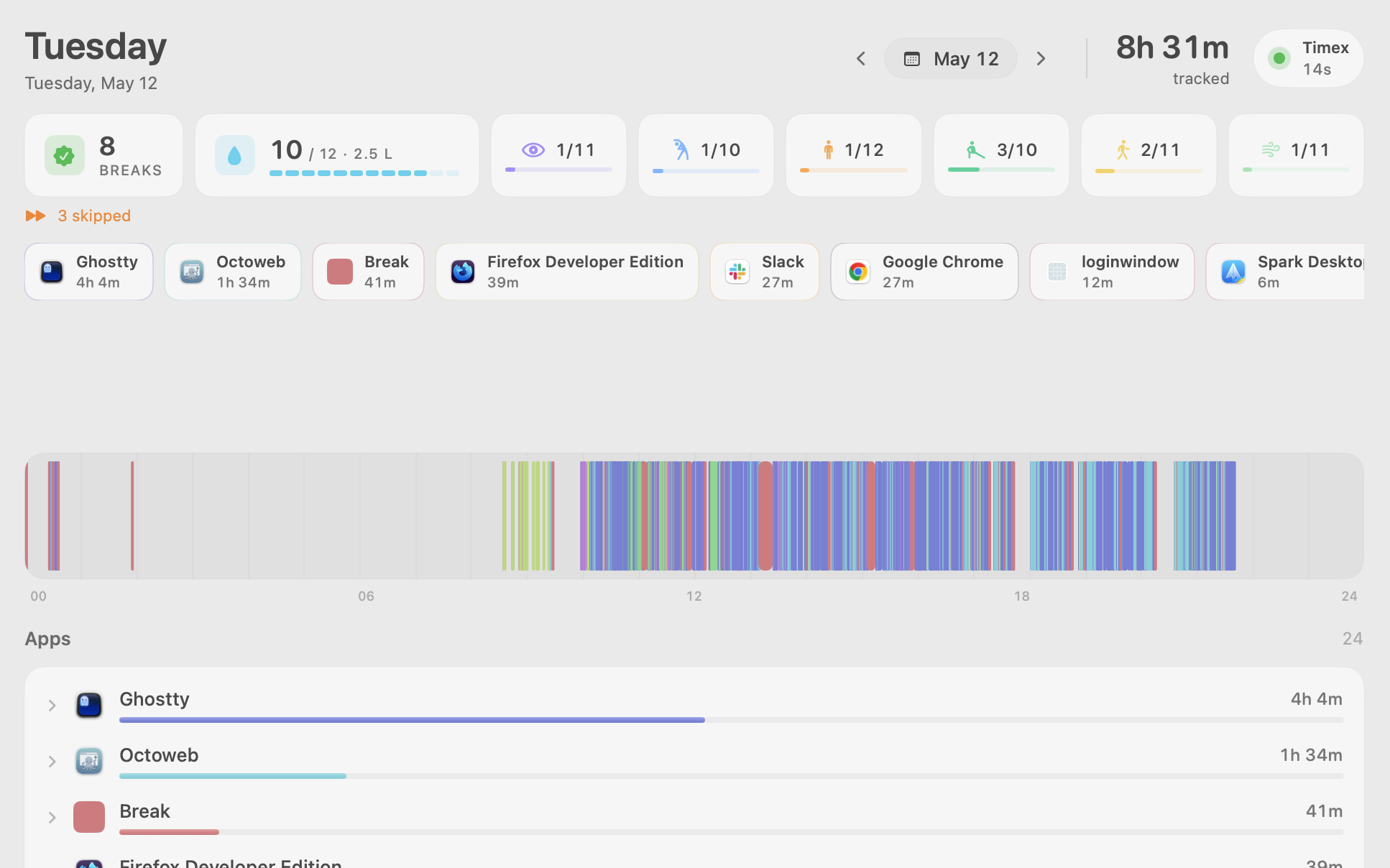
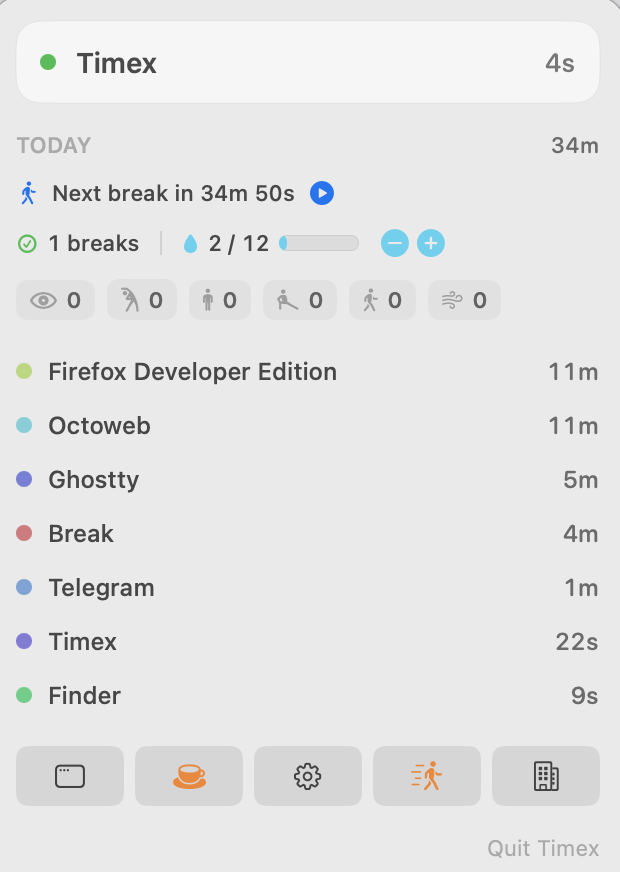
Track time automatically. No timer to start. No project to pick. Open your Mac, Timex is recording. The app you have focused, the window or document title, and (with permission) the browser tab — sampled once a second into a local SQLite file. Switch context, the previous block closes, a new one starts. The strip of bars in the Today view is just those blocks rendered along a 24-hour line. Drag onto a slice, the totals filter to that slice. Tap an app, it expands to show which windows or websites ate the time. That's the daily-use loop. There's nothing else to learn.
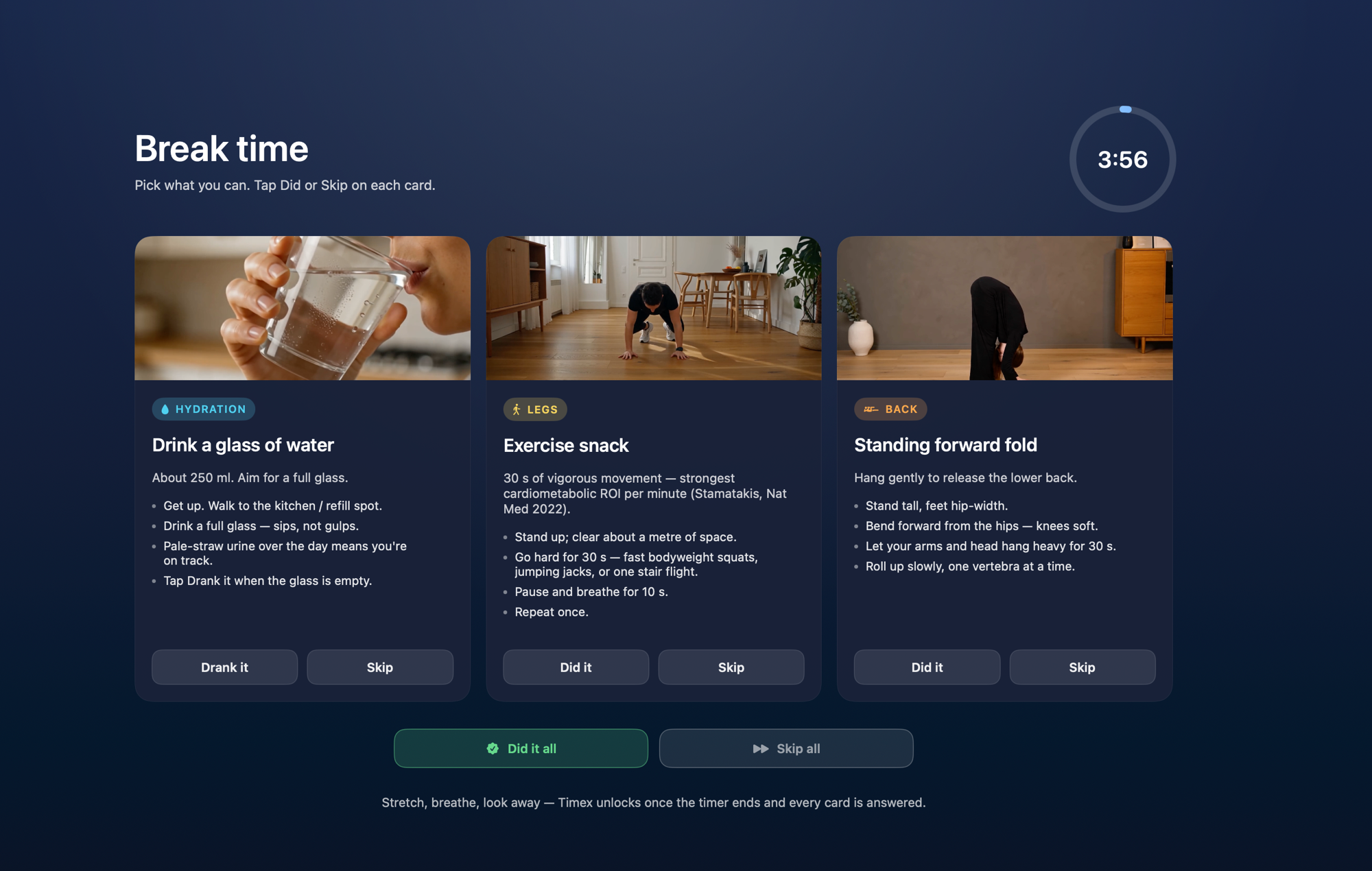
Remind you to take breaks. A timer that pauses when you're idle, so deep focus blocks don't get unfairly chopped up. Breaks come with short cinematic exercise videos — hydration, mindfulness, neck rolls, the back stretch you actually need. Skip them. Take them. The product doesn't care. It just remembers to ask.
Keep your Mac awake with the lid closed. A power assertion that holds while you're running a local LLM through Ollama, an overnight render, or a long batch job. No external display required. Open the lid when you want, close it when you don't. The clamshell-LLM workflow finally works on a laptop.
All three live in one menu bar pill. The tracker is the main thing. The break timer and the lid-down mode ride along because we use them every day anyway.
The Architecture of "Off"
Every time tracker we evaluated had at least one of these:
- A cloud sync that you couldn't disable
- An account login required before the app would launch
- A "productivity score" computed on their server
- Window titles that left your machine
Timex has none of those.
The whole product is a Mac app, a single file in your Library folder, and a menu bar pill. There's no server. There's no API endpoint to leak. There's no account that can be breached. Block its outgoing traffic with Little Snitch and the app doesn't notice. The data stays on the Mac that recorded it.
The file is timex.sqlite. That's it. One SQLite database in a format that's been stable for 25 years and will be readable on whatever computer you own in 2050. Open it with any SQLite tool. Run your own queries. Export to CSV. Pipe it into DuckDB. We don't lock you into our format because there isn't one.
This isn't a privacy policy we wrote. It's the architecture. There's nothing to phone home with.
What You Give Up
We want to be honest about the tradeoffs.
No multi-Mac sync. If you use a desktop and a laptop, each one has its own data. You can put the file inside an iCloud or Dropbox folder if you want a manual single source of truth, but that's bring-your-own and unofficial. Opt-in sync may land later. As a default, it won't.
No weekly insights email. Some people like a Sunday-morning recap. Timex isn't the right product if you need that as a delivery mechanism. We may build a local recap view inside the app. We won't build the version that gets sent from a server we operate.
No mobile app. Data lives on a Mac. You read it on a Mac.
No team features. No exports to your manager. No billable-hours generation. No leaderboards. If you bill clients by the hour, buy Toggl or Harvest. If you do team analytics, buy Timing or RescueTime. They're good at that. We're not trying to compete with them.
What you get in return is an offline time tracker that survives the company you bought it from getting acquired, your VPN flaking out, the wifi being down on a flight, and the next data breach making the news. The file doesn't care. It's yours.
The Economics of One Price
| Timex | Timing | RescueTime | Toggl | |
|---|---|---|---|---|
| Price | $24.50 once | $9–14/mo | $6.50–12/mo | $9–18/mo |
| Cost after 2 years | $24.50 | $216–336 | $156–288 | $216–432 |
| Local-only storage | ✅ | ❌ | ❌ | ❌ |
| Works offline | ✅ | Partial | ❌ | ❌ |
| Automatic tracking | ✅ | ✅ | ✅ | ❌ |
| Open SQLite format | ✅ | ❌ | ❌ | ❌ |
| Break timer | ✅ | ❌ | ✅ | ❌ |
| Lid-down (clamshell) mode | ✅ | ❌ | ❌ | ❌ |
| No account required | ✅ | ❌ | ❌ | ❌ |
$24.50. Once. Three Macs. No subscription tiers. No "pro" plan that removes limits you didn't know existed.
The trial is the part we're most proud of: 100 hours of recorded tracking for free — about 12 work-days, plenty to evaluate. The break timer and the lid-down mode stay free forever, even if you never pay. After the trial, $49 one-time (50% off with TIMEX50 through July 1, so $24.50 right now). Major v2 will probably be a paid upgrade. v1 keeps working forever.
We don't run a server. We don't have cloud bills. We don't need recurring revenue to keep a Mac app alive. We charge once.
How We Use It
We've been running Timex internally since March. Here's what showed up.
Where the day went. Drag onto a slice of the timeline strip, the totals below filter to that slice. Tap Claude Code, see which directories ate the morning. Tap Slack, see which channels owe the most attention. The honest answer to "what did I do today" is usually surprising, sometimes uncomfortable, always specific.
The clamshell trick. We run local LLMs through Ollama on M4 Pro laptops with the lid closed. Mac would normally sleep. Timex's lid-down mode holds it awake — no external display required, no caffeinate running in a stray terminal — and lets us leave an Octomind agent grinding overnight while the MacBook sits closed on a shelf.
Break timer that doesn't punish focus. When we're heads-down in code, the timer pauses when we go idle. A 90-minute focus block doesn't get chopped into 25-minute slices because we got coffee. The exercise videos are 90 seconds. We do them. Our backs thank us.
The end-of-week answer. Friday afternoon: open Today view, scrub the week, see what actually ate the time. Last week 11 hours went to one client refactor we'd budgeted for 6. The data didn't argue. It just sat there.
What's Coming
Timex 1.0.0 ships today. Here's what's already on the board:
- Per-project rules ("if window title contains X, tag as project Y") — for the people who do want lightweight project grouping
- Local-only "weekly recap" view inside the app — not an email from a server
- Optional opt-in iCloud sync between your own Macs
- Deeper Muvon ecosystem links (Octobrain for memory of decisions made, Octomind for agent runs that show up alongside your own work)
What's not changing: local-first, no cloud, no telemetry, one-time price.
FAQ
What is Timex?
Timex is an automatic time tracker for Mac that runs entirely on your machine. It samples your active app, window title, and (with permission) browser tab once a second into a local SQLite file. Plus a break timer and a lid-down mode. No cloud, no account, no subscription. $49 once.
Does Timex send my data anywhere?
No. The tracker writes to ~/Library/Application Support/io.muvon.timex/timex.sqlite. Block the app with Little Snitch and it keeps working. There's no server. There's no account.
Which Macs does it support?
Apple Silicon (M1, M2, M3, M4) running macOS Sequoia or newer.
How does Timex compare to Timing, RescueTime, or Toggl?
Timex is $24.50 once. Timing is $9–14/month, RescueTime $6.50–12/month, Toggl $9–18/month. Two-year cost: $24.50 vs $156–432. Timex is the only one that stores everything in a single local SQLite file you own outright.
Will it work after I cancel?
There is nothing to cancel. You buy it once. The app runs locally. If we vanish tomorrow, your last installed version keeps working forever on whatever Mac you have it on.
Can I export my data?
Yes — it's a SQLite file. Open it with any tool that reads SQLite. Run your own queries. Pipe it into DuckDB. There's no proprietary format to escape from.
Does the lid-down mode actually keep my Mac awake without an external display?
Yes. We hold a power assertion that prevents sleep regardless of whether a monitor is plugged in. Useful for running Ollama, long renders, or overnight Octomind agent runs on a closed laptop.
Is there a team or billing version?
No. If you bill clients or report to a manager, Timing or Toggl are better fits. Timex is for individuals.
Why one-time pricing?
Because we don't have server costs to amortize. The app runs on your Mac. There's nothing to host. Recurring revenue for a tool that runs entirely on someone else's computer felt dishonest. So we don't do it.
Try It
Timex is available now at gettimex.app. Free to try — 100 hours of tracking, the break timer and lid-down mode stay free forever. No account required. No data collected.
# Or if you prefer the terminal
brew install muvon/tap/timex
Launch promo: 50% off with code TIMEX50 through July 1. $24.50 once, forever.
We built this because we needed it. We forgot to start timers. We didn't want a coach. We just wanted to look at the day and see what actually happened.
If that's you — Timex is for you.
Drag onto a slice of the strip. Tap an app. The answer is right there. Then close the window and get back to work.